Gaussian Splat Visualization for CAD

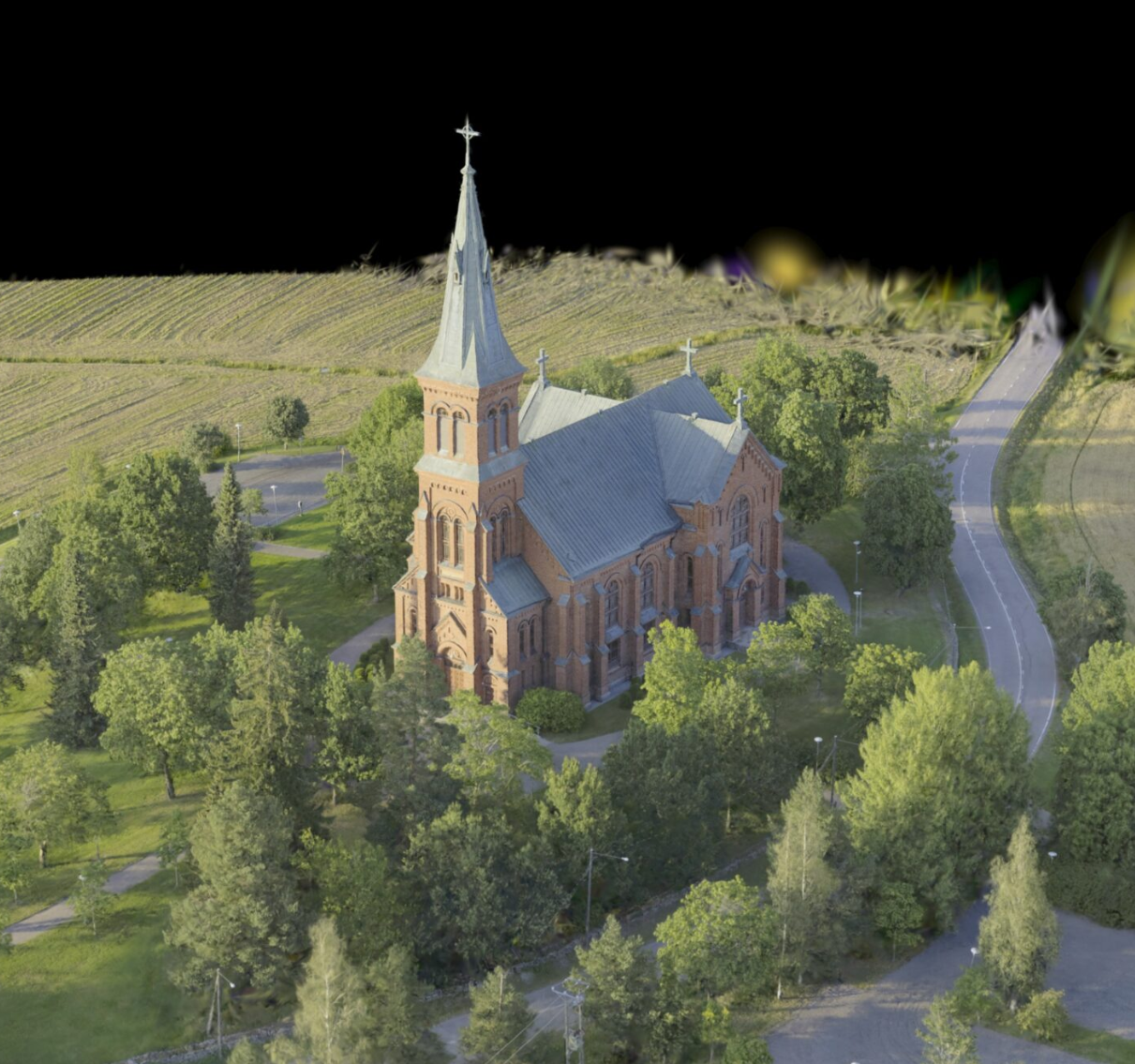
TerraSplat brings photorealistic 3D Gaussian Splatting directly into Bentley and Spatix CAD environments, so your point cloud and reality capture workflows gain a new, more lifelike layer of visualization without leaving the platform you already use.

AT A GLANCE

Features & Benefits

What TerraSplat does inside your CAD environment, and what that means for your team's day-to-day workflow.

FEATURES

Reads and displays .PLY files containing Gaussian Splats in their correct spatial projection, directly inside Bentley and Spatix CAD environments.
Runs as a standalone viewer, no TerraScan license required for basic splat visualization.
Integrates with TerraScan to combine Gaussian Splats with LiDAR point clouds in the same session.
GPU-accelerated rendering (NVIDIA) capable of displaying tens of millions of splats in real time.
Represents each sample as a semi-transparent colored 3D ellipsoid rather than a discrete point, producing smoother, more continuous visualizations than traditional photogrammetric point clouds.


BENEFITS

Photorealistic, real-time 3D representation of real-world environments, a step up from both point clouds and mesh models.

Captures fine or delicate detail, such as fences, foliage, and other semi-transparent or intricate structures, that mesh models tend to lose.
Accurately renders reflective and transparent materials like glass and water.
High interactive performance even on large datasets, so it is usable for live review sessions rather than just static renders.
No workflow disruption, splat visualization happens inside the CAD platform your team already uses for LiDAR and point cloud work.
Paired with TerraScan, enables accurate, class-based modeling that combines LiDAR precision with Gaussian Splat visual fidelity, useful for digital twins, stakeholder review, and site documentation.


WHY GAUSSIAN SPLATTING

A More Lifelike Way to See Reality Capture Data

3D Gaussian Splatting (3DGS) represents a step change from traditional photogrammetric point clouds, replacing discrete points with smooth, continuous, photorealistic scenes.

Visualization

Beyond Points and Meshes

Traditional point clouds render discrete points in space. 3DGS instead represents each sample as a semi-transparent colored 3D ellipsoid, producing a smoother and more continuous visualization of the captured environment.

Compared to mesh models, Gaussian Splats better represent delicate or complex objects such as fences, foliage, and other semi-transparent or finely detailed structures. They also capture reflections and transparency accurately, depicting materials like glass and water in a far more realistic way.

Thanks to GPU acceleration, tens of millions of Gaussian Splats can be rendered in real time, giving your team high performance, interactive visualization rather than a slow, static render.

BETTER TOGETHER

TerraScan + TerraSplat

Used on its own, TerraSplat reads .PLY files containing Gaussian Splats and displays them in their correct spatial projection inside Bentley and Spatix. Paired with TerraScan, it becomes a complete LiDAR and reality capture visualization workflow, giving your team both the geometric precision of LiDAR and the visual fidelity of Gaussian Splatting in a single CAD session.

This is especially valuable for teams already running TerraScan classification and modeling workflows who want a richer visual layer for stakeholder reviews, digital twins, and site documentation, without switching software or exporting data to a separate viewer.

TerraScan + TerraSplat Graphic-selection

− System Requirements −


Hardware Requirements

Quad-core processor or better, good processor frequency

16 GB RAM minimum, 32 GB RAM or more recommended for larger projects.

An NVIDIA graphics card is required for TerraSplat. VRAM requirements scale with project size, larger splat datasets need more GPU memory.

1024 x 768 resolution or better.

SSD or other fast-access storage recommended for smooth loading of large splat datasets.

Windows x64, version 7 or later.

Compatible Platforms

Spatix

MicroStation CONNECT Edition

PowerDraft CONNECT Edition

OpenCities Map CONNECT Edition 

ContextCapture Editor CONNECT Edition

OpenRoads Designer

Ready to Bring Gaussian Splats Into Your CAD Workflow?